The Kale and The Cocaine Phone
A few weeks ago I read this tweet about how George Mack has two phones: a Kale Phone and a Cocaine Phone.
The Cocaine Phone is a normal phone. Highly addictive. But also useful and hard to live without.
The Kale Phone is a healthy phone. No distractions. No notifications. Only the essentials.
I have long tried turning my phone more and more into the ideal Kale Phone. One of the best things I did was to always put my phone on ‘do not disturb’ mode. This little trick was a wonderful hack that eliminated a lot of noise. But going further has been hard as the default mode for most apps is distraction. Even though I do not have buzzing vibrations disturbing me, I still check my phone too often and let it interfere with my focus.
It has always felt like an uphill battle.
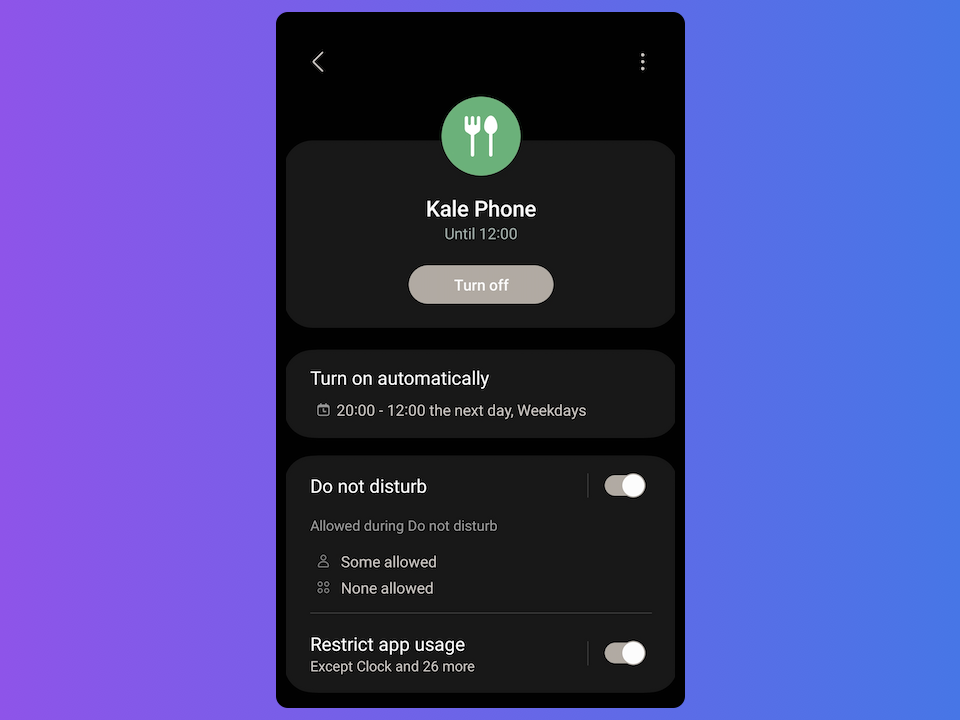
But the Kale and the Cocaine Phone gave me an idea. I didn’t go all the way with two phones. Instead I created a mode on my normal phone: a Kale Phone mode.
Here is what the mode looks like:
- Only calls from my contacts are allowed
- Only a limited set of apps are allowed
- It turns on automatically in the evening and off again at lunch the next day
It sounds simple. But this mode has been absolutely wonderful. I feel like I finally have a healthy relationship with my phone.
Here are some of the interesting things I have observed:
-
The biggest change from my previous attempts has been “opt in” vs “opt out”. In Kale Phone mode I have to explicitly allow an app to be used. In my previous attempts at cleaning up my phone I have tried turning off notifications from distracting apps. But this is a never ending battle as I install new apps.
-
Because it is only a limited time it is easier to exclude some apps. Going full dumb phone has never been super appealing to me as there are so many useful things on my phone. But I don’t need access to these things all the time. With Kale Phone mode I know I still have access to the other apps once I’m out of the mode. I sometimes try to use an app while still in Kale mode and my phone won’t let me. I then have a choice: turn off Kale Phone mode or wait and use the app later. Most of the time I wait for later.
-
Turning off communication has been one of the bigger wins. One of the biggest distractions I have on my phone is messenger apps. So I have now turned these off. People I know can still reach me – they can call or send a text if something is important. But I won’t see group messages and other communications until I’m out of Kale Phone mode. I love this. Previously I had a habit of checking messages and then often not responding right away anyways. But this would open a loop in my brain that I had to close at some point later. And that’s just bad use of energy.
-
Automatic mode switch is a good habit on auto pilot. My phone automatically becomes a Kale Phone in the evening. And when it does I know I’ll get my Cocaine phone back at lunch next day. Doing this automatically means I don’t have to spend energy keeping up this habit. The default is good behavior. If I want to stray away from my good habit I have to do something.
-
It takes a bit of time to figure out what apps to allow. My Kale Phone still has a lot of apps enabled. Music, podcasts, authenticators, wallet, notes, weather, sleep timer, maps, chrome, AI, etc. I generally don’t have a big issue with letting these things distract me. As long as they are not producing notifications I have to react to, I’m usually fine. What apps to allow is a balance and it took me a bit of time to set up my allowed apps. I could be more strict but then I also run the risk of turning on my Cocaine Phone more often. And I really want to avoid that. So instead I have allowed apps that still somewhat healthy.
I strongly urge you to try something like this. I has been such a great experience for me.
I’m on a Samsung Android phone and I have used the “Modes and Routines” feature. From what I can tell other Android phones should have something similar. For iPhones I don’t know but I assume they have something as well.